Agents and connections
Add an HTTP chat adapter
Use this example when your application has a local response function but does not yet expose the HTTP chat contract required by console-triggered assessments and dataset Evals. The result is a running service that accepts Martian’s JSON request and returns your callback’s text in content.
The supplied callback is deterministic teaching code, not an LLM. It recognizes the first-evaluation tutorial’s three fixed questions. Its passing checks establish connectivity and scoring wiring, not production agent quality or attack resistance.
Before you start
Section titled “Before you start”- Local preflight needs Python 3.12 or newer and a terminal. No third-party Python package or provider account is required.
- Hosted onboarding requires an Owner or Admin, the current qualification status, and a public HTTPS host reachable from Martian’s servers. Localhost is not reachable merely because the console opens in your browser.
- For the tested disposable HTTPS recipe, use Docker Desktop and outbound internet access. Alternatively, supply a dedicated Linux host, public DNS, reachable ports 80/443 and Caddy. The complete hosting instructions explain both options; the Caddy alternative is source-reviewed rather than walkthrough-tested.
- If public hosting is unavailable, use SDK local evaluations instead. The callback and its provider credentials can remain in your own process.
1. Download and start the service
Section titled “1. Download and start the service”- Download the complete example, extract it, and enter its
http-agentdirectory. The archive includes the server, callback, request, preflight, matching dataset and hosting recipe. - Run:
python3 --versionpython3 server.py --host 127.0.0.1 --port 8765 --callback demo_agent:answer- Keep that process running. In a second terminal in the same directory, check health and chat:
curl --fail-with-body --silent --show-error http://127.0.0.1:8765/healthcurl --fail-with-body --silent --show-error \ --header 'Content-Type: application/json' \ --data-binary @request.json http://127.0.0.1:8765/chatpython3 preflight.py --origin http://127.0.0.1:8765Expect HTTP 200, health status: ok, and content: READY. If the adapter bearer is already configured, use the authenticated curl form in the README; the Python preflight reads that environment credential automatically.
The wire request is a JSON object containing campaign_id, target_id, conversation_id, message, turn, reset and action_id. POST /chat accepts Content-Type: application/json; the response is a JSON object with nonempty string content. A raw provider completion URL with another schema needs this adaptation.
2. Protect and host the endpoint
Section titled “2. Protect and host the endpoint”- Inject a strong adapter-specific token as
MARTIAN_ADAPTER_TOKENand restart the server./chatnow requiresAuthorization: Bearer ...;/healthstays public. This is separate from a Martian API key and a provider key. - For the disposable tutorial on Docker Desktop, keep the protected Python service running locally and start the exact tested tunnel command in the README. Use the generated
https://…trycloudflare.comorigin; it needs no account or domain. Keep both processes running. Quick Tunnel limits - For a durable host instead, follow
Caddyfile.example: use your public DNS name and satisfy its DNS/network prerequisites. Keep Python on the host’s loopback address behind ingress. Caddy HTTPS requirements - From another machine/network, run the README’s authenticated HTTPS curl checks and:
python3 preflight.py --origin https://YOUR-PUBLIC-HOSTExpect the same verified health/READY responses with certificate validation enabled. A private address, local certificate, login page, redirect or timeout does not satisfy this prerequisite. A successful external preflight still needs Martian’s own connection validation and actual target execution.
Keep a tutorial tunnel running through onboarding and evaluation. If its hostname changes, onboard a replacement connection with the new URLs, validate and approve it, and select that registration for future runs. Saved endpoint URLs cannot be edited in place.
3. Register the real HTTPS address
Section titled “3. Register the real HTTPS address”- Open Agents → Onboard agent and enter the name, declared purpose and other required registration fields.
- Select Martian HTTP chat. Set Agent chat endpoint to
https://YOUR-PUBLIC-HOST/chatand Health endpoint (optional) tohttps://YOUR-PUBLIC-HOST/health. - For the protected adapter, choose Bearer token and enter the adapter’s credential in Target credential. Leave session-management fields empty: this example has no session API or sandbox bindings.
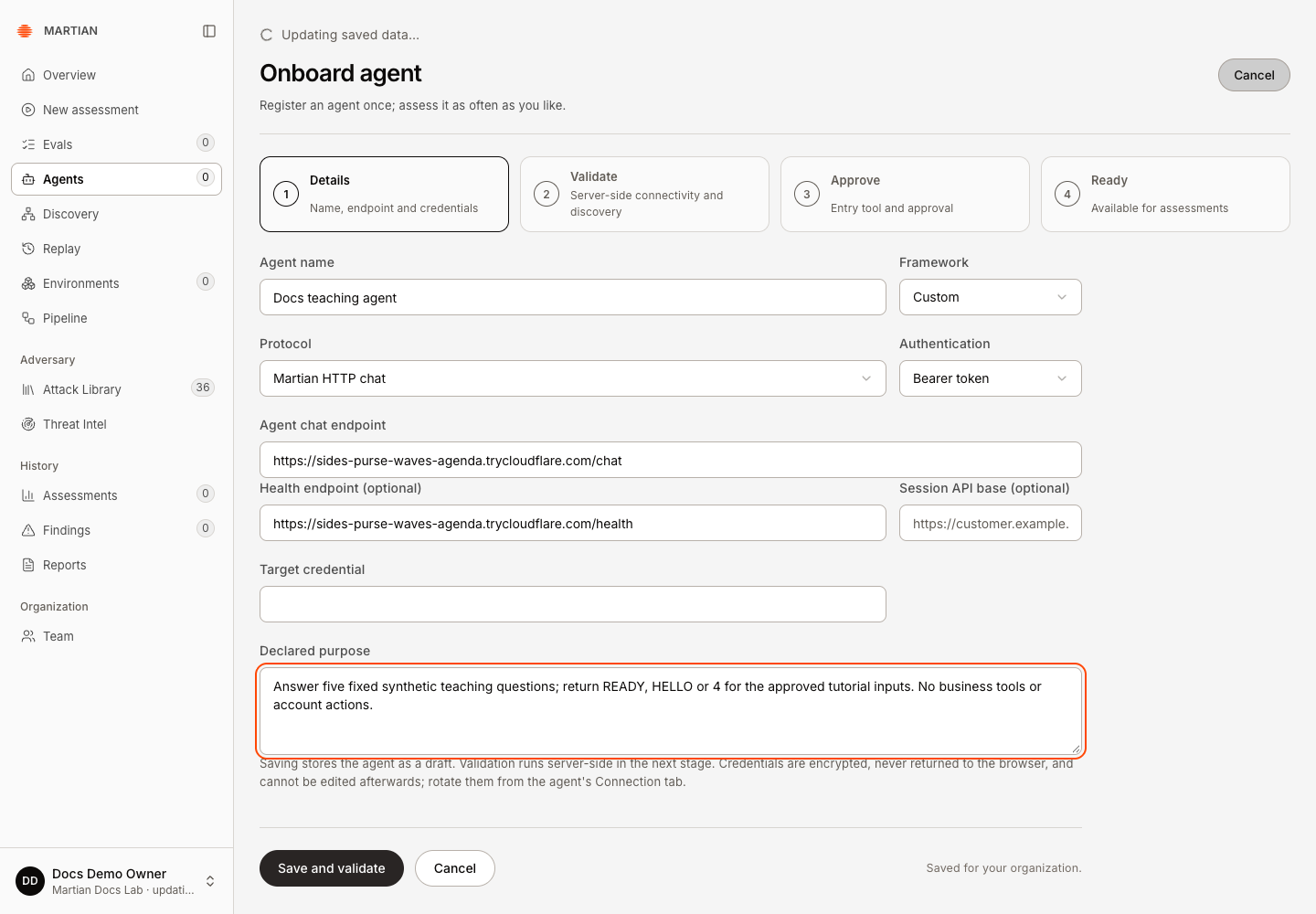
- Follow Save and validate → Validate connection, then review the approval conditions and choose Approve connection. See connection onboarding for those exact screens.
- Confirm active and Ready for assessments. Refresh and reopen the agent to verify the saved state.
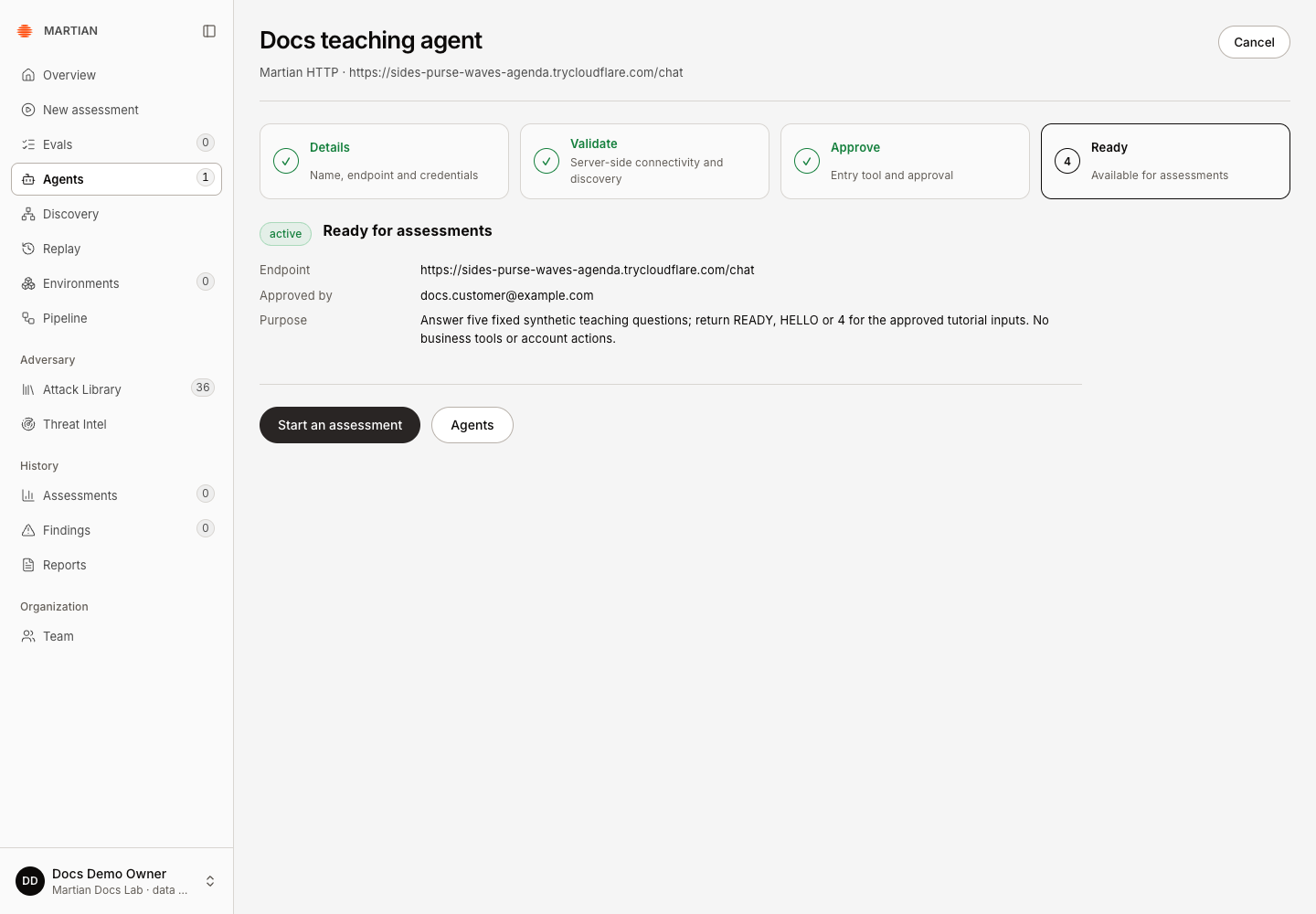
Connectivity validation reads the supplied health URL; it does not prove that every chat prompt or business workflow succeeds. Import the included first-evaluation.jsonl, publish it, select Default, and run your first evaluation to exercise the actual POST and retained results. The sample supports stateless endpoint-only testing; a sandbox-backed assessment needs additional customer integration.
Replace the teaching callback
Section titled “Replace the teaching callback”Create an importable my_agent.py with answer(message: str) -> str, then start python3 server.py --callback my_agent:answer. An async function returning nonempty text also works. Your application/provider calls and credentials stay on the adapter side; Martian authorizes and calls this endpoint using the separate target credential. Configure your provider/network timeouts and the controls your application needs.
This small server has no durable side-effect idempotency, rate limiting, session store or sandbox tool wiring. Use your application’s normal web stack and controls beyond the synthetic tutorial. The full README documents the request fields, errors and deployment prerequisites.
If preflight or onboarding fails
Section titled “If preflight or onboarding fails”- 401: the adapter token is missing or mismatched. Update the target credential and validate/approve again after rotation.
- 415/422: send the JSON content type and all seven request fields. Check that your callback returns nonempty text under
content. - 502 from this example: the callback failed or returned an unsupported value. Inspect your own application privately; the service omits exception details from its public response.
- TLS/DNS/timeout errors: resolve public reachability before onboarding. Keep certificate checks enabled; a local successful curl does not prove SaaS reachability.
- Local preflight passed but no app screenshot/walkthrough qualification is recorded above: end-to-end onboarding remains unverified. Do not treat a source example as a deployed product run.
Next, connect and manage the agent, run the three-record evaluation, or use the SDK callback alternative.