SDK and CI
Install and configure the SDK
Install the Python package and create the platform connection used by Evals and red teaming. At the end, you will have a verified SDK installation, a scoped API key, and a validated tutorial configuration.
Only need local evaluations? Start with a suite file; it needs no Martian account. For package releases, see PyPI release history. Recorded test versions and execution limits live in the verification record.
Before you start
Section titled “Before you start”For the account-free local Evals preview, complete step 1 below using Python and Git. API keys, a Backend origin and organization services are needed when you continue to platform persistence.
- Use Python 3.12 or newer. The commands below use a macOS/Linux shell or WSL.
- Install Git. The tutorial creates a local Git repository so a persisted CI result can name the exact committed code revision.
- An owner or admin creates API keys. Running the SDK uses that key’s permissions and restrictions; the key does not grant console administration.
- Your organization must have the compatible Backend services enabled. Hosted red teaming also needs enabled organization entitlement and configured generation/judging. Installing the package does not activate those services.
- Obtain your organization’s approved Backend origin. It may differ from the browser console address. Use the origin without
/v1, a query, or another path.
1. Download the runnable tutorial and install the release
Section titled “1. Download the runnable tutorial and install the release”Download the complete tutorial. Start in the directory containing that download. The following commands extract a new folder, make that folder an isolated Git repository, commit the tutorial source, and install the SDK there:
unzip martian-sdk-tutorial.zip -d martian-sdk-tutorialcd martian-sdk-tutorialgit init -b maingit add -- .gitignore README.md demo_agent.py pytest.ini \ support-regressions.jsonl redteam.yaml redteam.py combined_ci.py \ key_agent_id.py github-actions.yml tests/evalsgit commit -m 'Add Martian SDK tutorial'python3 --versionpython3 -m venv .venv.venv/bin/python -m pip install --upgrade 'martian-sdk[evals]'.venv/bin/martian --versionIf Git asks for your identity, set git config user.name 'Your Name' and git config user.email 'your-email@example.com' inside this tutorial repository, using your own details, then repeat the commit. The extracted ZIP itself has no Git history; the commit above is what makes the later revision command meaningful.
Run all remaining local commands from this repository’s root. Its relevant layout is:
martian-sdk-tutorial/ .gitignore demo_agent.py pytest.ini support-regressions.jsonl redteam.yaml redteam.py combined_ci.py key_agent_id.py github-actions.yml tests/evals/test_quality.py tests/evals/test_dataset.py .venv/ # local; ignored by Gitgit rev-parse --show-toplevel should identify this folder. The callback, test imports, YAML-relative callback path and CI commands all use this layout. To use an existing customer repository instead, follow the complete copy and adaptation checklist; copying the workflow alone is insufficient.
The final command prints your installed SDK version. The evals extra adds the pytest/MLflow dependencies needed for evaluations and persisted CI; base redteam support is part of the distribution. The optional mcp extra is for customer-side MCP integration, not a requirement for this tutorial.
Use a fresh environment when migrating from old code-bearing martian-redteam or martian-evals-kit installations. The modern package retains compatibility imports, but the examples here use martian.evals and martian.redteam.
2. Open API-key management
Section titled “2. Open API-key management”- Sign in to the intended organization as an owner or admin.
- Select Evals, then Runs.
- Find the API keys section and select Create key.
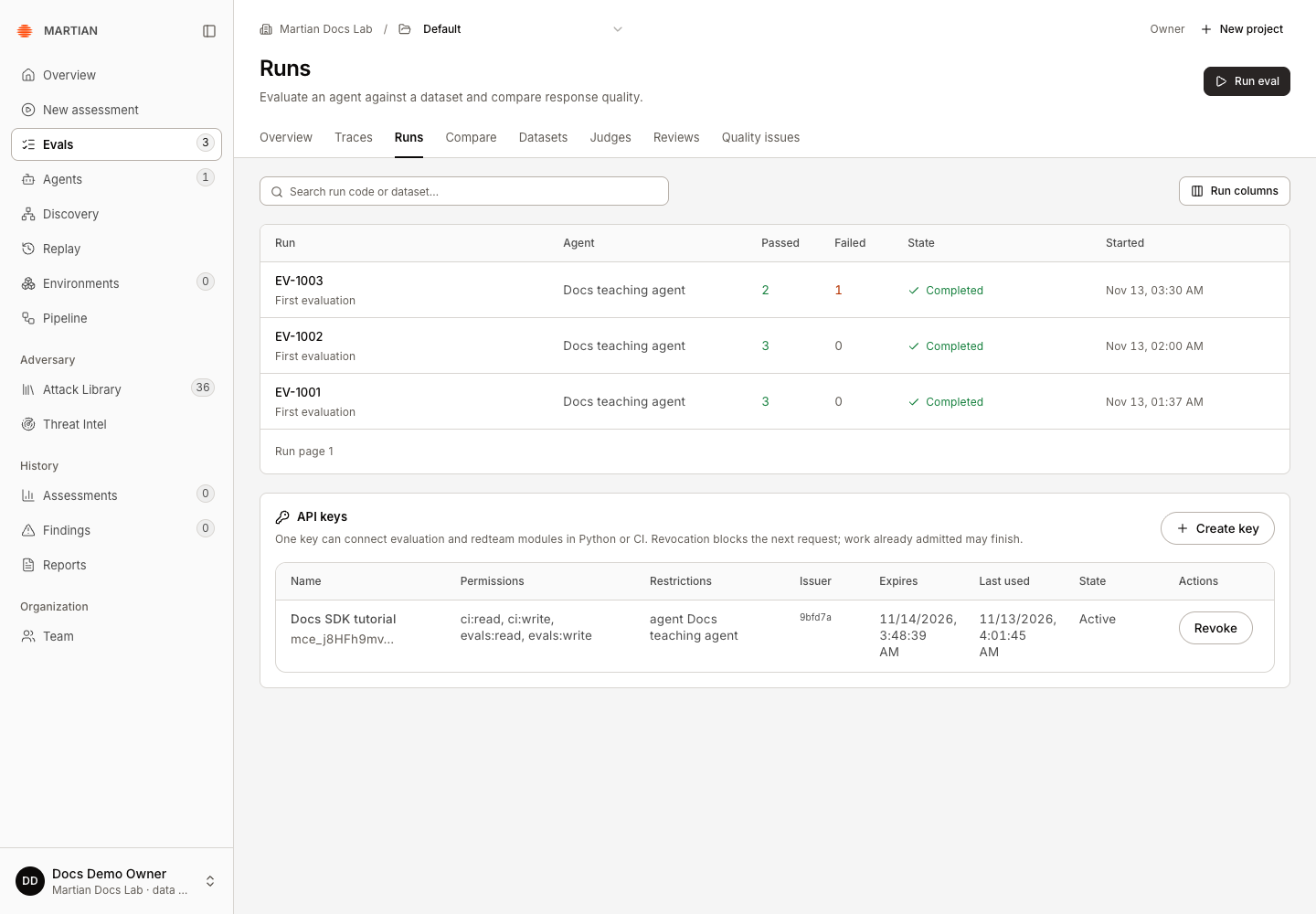
API keys are managed on the Evals Runs page. If the section is absent, check the selected organization and your role before looking for another settings page.
3. Choose the smallest useful permissions
Section titled “3. Choose the smallest useful permissions”In Create API key, enter Key name, set Expires in days, then select the required Permissions.
| UI permission | Capability | Needed for |
|---|---|---|
| Read evaluation datasets and results | evals:read |
Pulling datasets and reading evaluation results |
| Upload evaluation results | evals:write |
Uploading locally executed dataset outputs |
| Read CI sessions | ci:read |
Reading saved sessions and export status |
| Upload CI sessions | ci:write |
Persisting checks and CI sessions |
| Run hosted redteam generation and judging | redteam:run |
Hosted attack generation and judging |
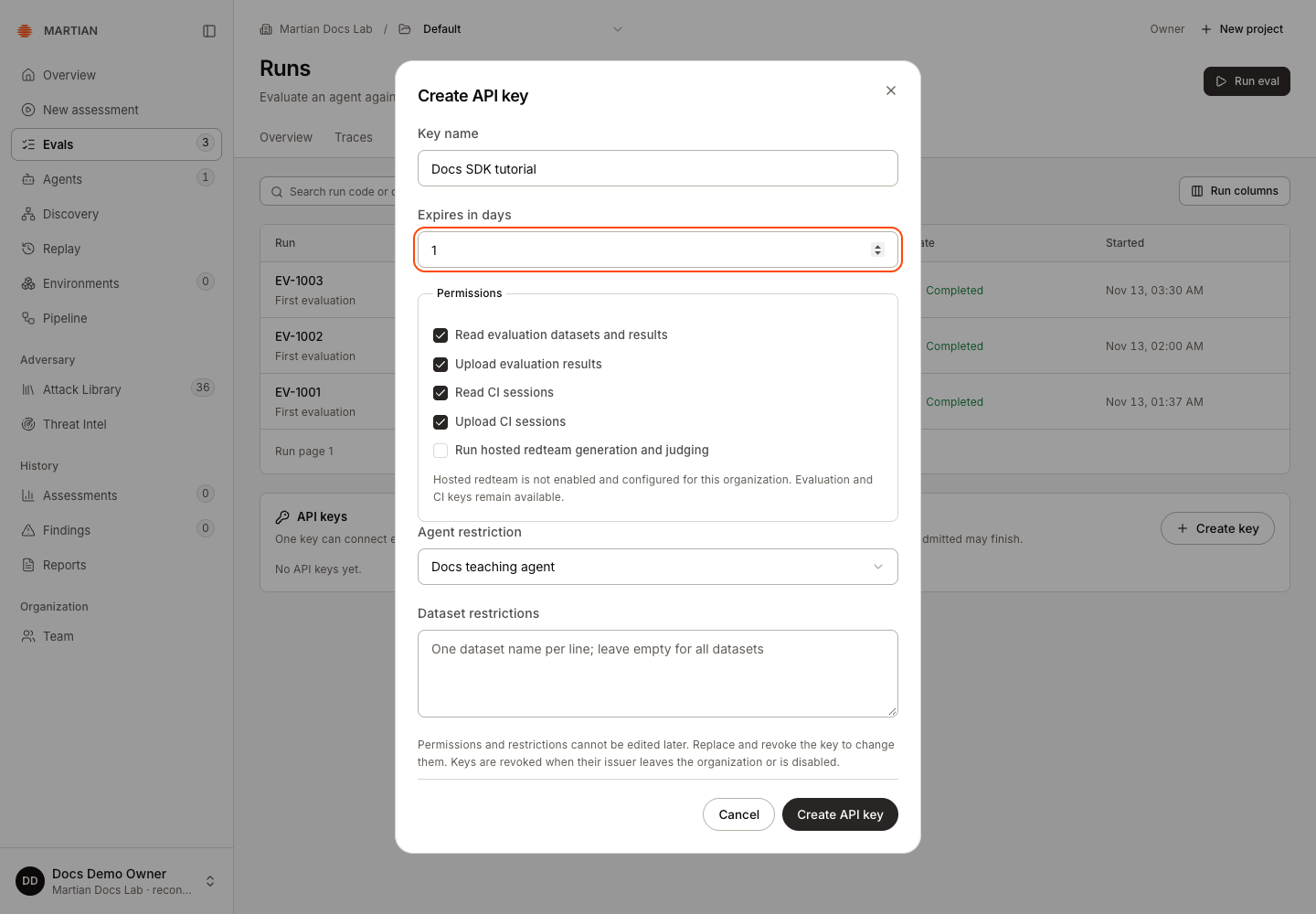
For the complete Evals/CI tutorial, keep the four evaluation/CI permissions. Add Run hosted redteam generation and judging for redteam or combined runs. If that option is disabled, the dialog explains that hosted redteam is not enabled and configured; request access from your workspace administrator instead of changing credentials or retrying execution.
For the persisted CI tutorial, select the intended existing registration by name under Agent restriction. If no registration exists, complete agent connection onboarding first or have your workspace owner identify the existing demo registration to use. Running a local Python callback does not create a registration.
All agents / standalone use is available for an unrestricted key, but it does not identify one agent UUID for the lookup below. Dataset restrictions accepts one dataset name per line; an empty list permits datasets otherwise available to the key. Restrictions and permissions cannot be edited after creation.
Select Create API key. In Save your API key, save the once-shown value in your secret manager, then select Done. The ordinary key list contains safe metadata and a prefix, not the secret. Keep this disclosure out of screenshots, recordings, logs, and Git.
4. Configure your local process
Section titled “4. Configure your local process”Set the approved origin. For a local tutorial, this masked prompt reads the key without putting its value in shell history:
export MARTIAN_API_URL='https://YOUR-APPROVED-BACKEND-ORIGIN'export MARTIAN_API_TOKEN="$(.venv/bin/python -c 'import getpass; print(getpass.getpass("Martian API key: ")))"Replace the example origin with the value supplied for your workspace. HTTPS is required except loopback development. The SDK does not load .env automatically and does not use YAML to select a different platform origin.
The equivalent explicit Python connection is:
import osfrom martian import MartianConfig
config = MartianConfig( api_url=os.environ["MARTIAN_API_URL"], token=os.environ["MARTIAN_API_TOKEN"],)Supply one MartianConfig or the complete URL/token pair. The default request timeout is 120 seconds, within a supported 1–240-second range. Redirects and environment proxies are disabled by default. Your callback’s model/provider credentials are separate from this platform key.
5. Resolve the exact CI agent UUID
Section titled “5. Resolve the exact CI agent UUID”With the agent-bound key loaded, run the included key_agent_id.py helper:
MARTIAN_AGENT_ID="$(.venv/bin/python key_agent_id.py)" && export MARTIAN_AGENT_IDThe helper performs the supported, read-only GET /v1/sdk/capabilities operation using your platform key and reads its agent_id field. Backend validates organization ownership when an agent-bound key is issued. The helper prints only that exact UUID on success; it never prints the key and never executes a target or model.
If it reports that the key is not agent-bound, create a replacement key with the intended Agent restriction, load the new token, and repeat. Do not invent a UUID or use a UUID from another organization.
The registration provides a label and access binding for saved CI records. The SDK still invokes demo_agent.answer from the committed local checkout; it does not call the registration’s remote connection. Selecting a registration does not attest that the local callback is the same binary as a deployed agent. Choose the registration deliberately with the workspace owner and describe a tutorial run as a tutorial.
Standalone dataset reads and standalone redteam need no CI agent UUID or Git revision. If you are only using those interfaces, you can omit this step.
6. Validate and pin the tested revision
Section titled “6. Validate and pin the tested revision”.venv/bin/martian redteam validate redteam.yamlExit 0 means the YAML, catalog choices and callback reference are valid. Validation does not call a model or invoke the target callback. It does not prove platform authentication or hosted readiness.
From the same tutorial Git repository, set the tested revision and private local store for persisted CI:
git status --shortexport MARTIAN_EVALS_GIT_SHA="$(git rev-parse HEAD)"export MARTIAN_EVALS_STORE_DIR="$PWD/.martian-local-mlflow"Review git status --short: commit any intended callback, test or configuration edits before setting the revision and running the gate. Generated environments, stores and result files are ignored by the tutorial’s .gitignore. An agent-bound key must match the exact MARTIAN_AGENT_ID obtained above. When moving to your customer repository, commit the actual target code and tests there and take that repository’s revision instead.
Verify success and handle failures
Section titled “Verify success and handle failures”- Installed:
martian --versionreports an installed release. - Configured: the origin is correct and the key is available only to the intended process or trusted CI job.
- Validated: the tutorial YAML exits
0. A later authenticated command is still required to establish service access. - Permission denied: check capabilities, agent/dataset restrictions, organization, expiration and revocation. Do not switch to an operator credential.
- Key lost or restrictions changed: create a replacement, update consumers, and select Revoke on the old key. Revocation blocks later requests; already admitted work may finish. Issuer removal or disablement also revokes issuer keys.
- Network or setup failure: preserve the safe error code/operation ID and follow troubleshooting. An uncertain execution is not a reason to submit the same work again.
Continue with SDK evaluations, one redteam probe, or combined CI. See permissions for role and capability boundaries.