Discovery
Connect sources and inspect inventory
Build an inventory from authorized infrastructure evidence and inspect what qualifies each record as an agent, candidate or supporting workload. Enrollment succeeds when the source is saved, its intended collector reports and retained inventory appears with a clear freshness boundary.
Before you start
Section titled “Before you start”Any signed-in tenant user can inspect accessible inventory. Owner or Admin is required to create/manage sources and reporting bindings. Your operator must authorize the provider scope, such as a Kubernetes cluster alias or named AWS account/regions and read-only role. Customer-side collection requires the actual collector to be installed and running in that authorized environment.
Source collection, runtime reporting and assessment connections have separate credentials and purposes. Creating a source does not start a process or stop an agent.
Enroll a read-only source
Section titled “Enroll a read-only source”- Open Discovery → Sources and choose Connect source to open Add a read-only source.
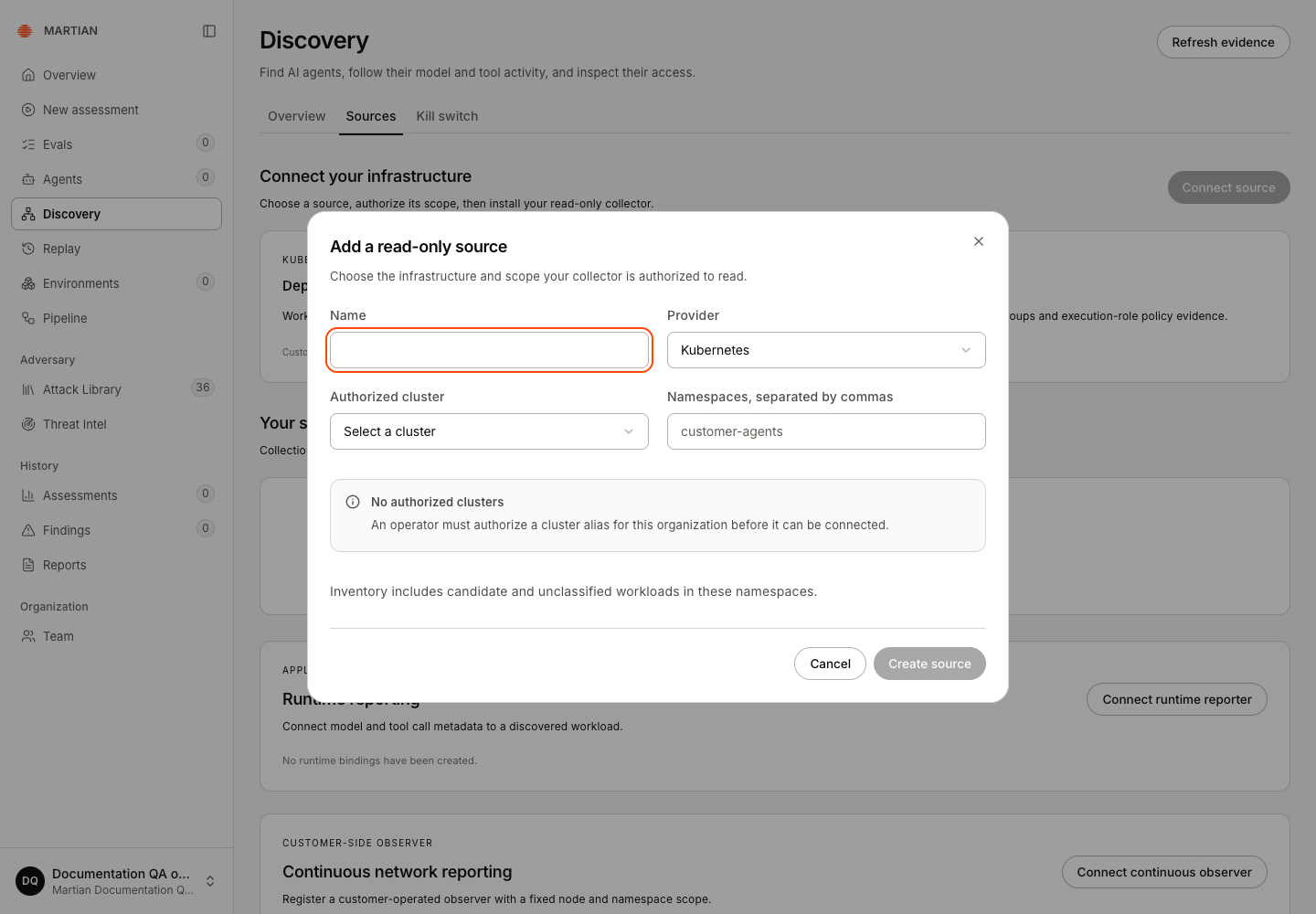
- Select the supported provider and enter its authorized scope. For Kubernetes, choose an authorized cluster and namespaces. For AWS Bedrock, enter the approved account, regions and Read-only role ARN. An empty authorized-cluster list needs operator setup first.
-
Once an authorized scope is available, review it and click Create source. If the form says No authorized clusters, stop here and request the operator setup; the captured form has Create source disabled.
-
For a customer-side collector, save its once-shown credential privately and Download scope assignment or Download assignment. The assignment describes scope; the separate credential authenticates the collector. Close the credential panel before making screenshots or sharing the screen.
-
Install/run the approved collector with that assignment and private credential in its authorized environment. Use the installation package and instructions supplied for your deployment; an enrollment alone is not collection. For hosted collection, the configured hosted reader performs the work.
-
Inspect Your sources, collection mode, collection state, interval and Last success. Use Collect now only for an enabled, authorized source. It queues the next collector poll; it does not itself collect inventory.
-
Wait for a distinct collection run and a newer completion / Last success time. Inspect its complete, partial or failed coverage and the retained workload identities, then refresh. A queued response or an unchanged old inventory snapshot is not evidence of a new successful collection. If the collector cannot run, fix that prerequisite instead of repeatedly selecting Collect now.
Review inventory and evidence
Section titled “Review inventory and evidence”- Open Discovery → Overview and choose Dashboard source or all sources.
- Inspect the inventory’s agent/candidate view and its evidence labels. Runtime-observed requires qualifying trace-correlated model/tool reports; Provider-listed identifies a managed agent listed by its provider. Metadata or registration alone remains a candidate.
- Use Search displayed agents for the loaded page. Check loaded/total counts and pagination; a page search is not a proof that the entire organization has no matching record.
- Select a record and inspect its evidence, source freshness and deployment context. Supporting workloads are accessed under Sources rather than counted as independently established AI agents.
- Continue to Runtime activity or Blast radius to inspect a selected deployment’s evidence. Infrastructure inventory by itself does not report actual model/tool calls or independently establish effective permission.
Manage collection and recover
Section titled “Manage collection and recover”- Pause collection / Resume collection changes the reader’s activity. It does not contain the customer’s workload or cancel an assessment.
- Replace credential rotates a customer collector credential. Install the replacement in the intended collector; saving it does not restart that process automatically.
- A stale or failed source needs its actual reader, authorization and connectivity checked. Do not treat a retained old snapshot as fresh inventory.
- Revoking a runtime reporter is a different operation from pausing inventory collection. Separate historical identity evidence from recent activity.
- Network observations do not promote a workload into an agent or prove that every connection succeeded.
Network capture and continuous observers have a separate setup and lifecycle; inventory-reader credentials do not install node sensors. Continue with runtime reporting and blast radius and call gates. Review permissions and limits before interpreting coverage.